System version: 4.5.91
Android Version: 2.3.4
Instructions found below:
http://www.digitaltweaker.com/android/phones/2011/07/root-motorola-atrix-4-5-91-on-gingerbread-2-3-4/
If you get the "device not found" error when running "adb shell" then make sure you have sync drivers installed. When you connect Atrix to your computer the first time it installs a bunch of drivers and also gives an option to install "synch drivers". Make sure to install the "sync drivers".
Saturday, August 13, 2011


Thursday, July 07, 2011
Repository for JBoss RestEasy Releases
We have been using JBoss RestEasy for developing restful services. The framework is new and we have had to change the repo many times with various version releases and often times the repos fail with permission denied error or dependencies resolution error. A more stable repo for RestEasy is being maintained by the Atlassian folks. We use the below repo and its been working consistently and updates with new releases fairly quickly
https://maven.atlassian.com/content/repositories/jboss-releases
https://maven.atlassian.com/content/repositories/jboss-releases
Wednesday, June 01, 2011
Check Logged Person In Campfire Room
We use campfire as a sole medium for team communication so its essential every team member is logged in so they are accessible. All team members use Mac and we use the Fluid app to run Campfire as a app. The app logs out automatically sometimes when in not use and we needed a way to get alerted when member was not logged into campfire.
Campfire has a pretty nifty API that allows to query many room attributes. Below script can be used to detect if a person is not logged in. Each of our team member has the below script cronned in their machines to run every 10mins or so to get alerted when they have been logged out. below are the attributes you need to substitute
{authcode here} - To get your auth code in Campfire go to "Edit my Campfire account" or "My Info" at the top screen in Campfire and there you will see your auth code. This is a secret code and should not be shared with others so be watchful and ensure the below script only has read/execute perms for the member user on the box.
"#{id}" - To get the room ID simply login to Campfire and click on the room. The browser url should show the room ID.
{member name} - Should be the same as the name specified when creating campfire account
Campfire has a pretty nifty API that allows to query many room attributes. Below script can be used to detect if a person is not logged in. Each of our team member has the below script cronned in their machines to run every 10mins or so to get alerted when they have been logged out. below are the attributes you need to substitute
{authcode here} - To get your auth code in Campfire go to "Edit my Campfire account" or "My Info" at the top screen in Campfire and there you will see your auth code. This is a secret code and should not be shared with others so be watchful and ensure the below script only has read/execute perms for the member user on the box.
"#{id}" - To get the room ID simply login to Campfire and click on the room. The browser url should show the room ID.
{member name} - Should be the same as the name specified when creating campfire account
#!/bin/bash
curl -s -u {authcode here}:X "https://{your specific domain}.campfirenow.com/room/#{id}.xml" > /tmp/campfire-room.xml
present=`grep "{member name} " /tmp/campfire-room.xml | wc -l`
if [ $present -eq 0 ]
then
`/usr/local/bin/growlnotify --name "Not Logged In Campfire" -s --message "You are not logged into campfire.
This might reflect in your performance review next year so you better login now :)"`
fi
Sunday, May 08, 2011
Transitioning Traditional Data Support Folks To New Breed ETL Systems
Like many other folks out there who are discovering the power of data compute grids, we recently transitioned a part of our traditional database based ETL system to Hadoop based processing system. Being in the digital advertising field, we get a whole lot of impression data both from our tracking systems and external. Our existing ETL system is mainly comprised of four components: cleansing, standardization, dimensioning, aggregation.
The cleansing and standardization components that involve a whole lot of text parsing and mapping take the major brunt as they deal with the raw volume of incoming data. As part of the transition we moved these two components to the new system. We have a dedicated product support team that handles most of the daily user data queries. Issues like missing/incorrect data, re-running jobs due to changed dimensions or external data outages, configuring and testing new data fields/sources, generating ad-hoc reports, configuring new clients etc. These folks have a thorough domain knowledge and are well versed with this data. They also fully understand the current ETL data flow and the various business rules thats gets applied as part of the data processing. Technology wise they are comfortable with databases, SQL, basic scripting, Excel and are usually enthusiastic about learning new technologies as need be.
To be able to perform the above mentioned issues, they essentially need a way to slice and dice raw/stage level data and with the data residing in HDFS this becomes an issue. We have been brainstorming ways on how to expose the new system to support folks and below are some options.
Apache Hive: Facebook was the first company to encounter this problem wherein they transitioned their analysts folks from a RDBMS based warehouse to a more scalable hadoop system. They developed Hive which is essentially a data warehouse system for Hadoop that facilitates easy data summarization, ad-hoc queries, and the analysis of large datasets stored in Hadoop compatible file systems. Hive provides a mechanism to project structure onto this data and query the data using a SQL-like language called HiveQL. HiveQL is very similar to SQL although it does not support the full SQL-92 specification. As per my reading it more closely resembles MySql's SQL dialect and that makes sense because Facebook is a mysql shop and a similarity would make the transition easy for its folks. This option stands top in our list of possibilities given its similarity to SQL.
Apache Pig: Apache Pig is also a higher level abstraction for map/reduce. Pig uses Pig Latin language to express data flows. Although this is a powerful tool, it would require the support folks to learn a entirely new language.
Commercial tools like Datameer, IBM Big Sheets: It is a well know fact that Microsoft Excel is most versatile analytic tool. Analysts love the ease of use and the tools it provides to slice and dice/graph datasets. Imagine an Excel like tool with the power of Hadoop. Its essentially what these commercial tools are. We recently received a great demo from the Datameer folks and were impressed by its ease of use and especially its pluggable architecture. Easy and familiar spreadsheet-like interface for business users with complete set of data integration, transformation/analytic and visualization tools. It also has a neat scheduler for cron based job scheduling. This option is also a strong contender in our option set given its ease of use and spreadsheet like usability and feel.
We haven't decided on an option yet. The next couple of weeks will involve closely working with support folks to evaluate these options and ensuring a smooth transition.
The cleansing and standardization components that involve a whole lot of text parsing and mapping take the major brunt as they deal with the raw volume of incoming data. As part of the transition we moved these two components to the new system. We have a dedicated product support team that handles most of the daily user data queries. Issues like missing/incorrect data, re-running jobs due to changed dimensions or external data outages, configuring and testing new data fields/sources, generating ad-hoc reports, configuring new clients etc. These folks have a thorough domain knowledge and are well versed with this data. They also fully understand the current ETL data flow and the various business rules thats gets applied as part of the data processing. Technology wise they are comfortable with databases, SQL, basic scripting, Excel and are usually enthusiastic about learning new technologies as need be.
To be able to perform the above mentioned issues, they essentially need a way to slice and dice raw/stage level data and with the data residing in HDFS this becomes an issue. We have been brainstorming ways on how to expose the new system to support folks and below are some options.
Apache Hive: Facebook was the first company to encounter this problem wherein they transitioned their analysts folks from a RDBMS based warehouse to a more scalable hadoop system. They developed Hive which is essentially a data warehouse system for Hadoop that facilitates easy data summarization, ad-hoc queries, and the analysis of large datasets stored in Hadoop compatible file systems. Hive provides a mechanism to project structure onto this data and query the data using a SQL-like language called HiveQL. HiveQL is very similar to SQL although it does not support the full SQL-92 specification. As per my reading it more closely resembles MySql's SQL dialect and that makes sense because Facebook is a mysql shop and a similarity would make the transition easy for its folks. This option stands top in our list of possibilities given its similarity to SQL.
Apache Pig: Apache Pig is also a higher level abstraction for map/reduce. Pig uses Pig Latin language to express data flows. Although this is a powerful tool, it would require the support folks to learn a entirely new language.
Commercial tools like Datameer, IBM Big Sheets: It is a well know fact that Microsoft Excel is most versatile analytic tool. Analysts love the ease of use and the tools it provides to slice and dice/graph datasets. Imagine an Excel like tool with the power of Hadoop. Its essentially what these commercial tools are. We recently received a great demo from the Datameer folks and were impressed by its ease of use and especially its pluggable architecture. Easy and familiar spreadsheet-like interface for business users with complete set of data integration, transformation/analytic and visualization tools. It also has a neat scheduler for cron based job scheduling. This option is also a strong contender in our option set given its ease of use and spreadsheet like usability and feel.
We haven't decided on an option yet. The next couple of weeks will involve closely working with support folks to evaluate these options and ensuring a smooth transition.
Friday, March 18, 2011
Maven3 error "Could not find artifact"
We recently switched our artifactory repo to a new server and things were fine with build running fine. One of the team dev deployed a new artifact version to the repo and that caused the build to fail. We kept getting the below error on our continuous integration server while the build was working fine on all dev boxes
We debugged this issue for a while and made sure the artifact was deployed correctly to the repo and all that but the main issue was that in the error message the artifact location was wrong. It was looking in the localhost. We checked the POM and ensured the repositories link specified were correct. After quite a bit of head banging we leaned towards a issue with local cache of repo and decided to purge the local repository. We deleted the .m2/repository/artifact directory and that resolved the above error but gave the below error
We were still looking to find as to why it was not pointing to the correct repo location. The fact that it was working fine on all all places made us believe that there was a specific issue with the continuous integration box so we decided to specify a override on the local repo location so it downloads fresh a copy of all dependencies and thats when we saw a default mirror repo location specified in the local m2 settings.xml file. The file had the below properties set
That was causing the issue. We modified this to point to the new repo location and boom the error was gone
"Failed to execute goal on project... Could not resolve dependencies for project....SNAPSHOT: The following artifacts could not be resolved: {new artifact}. Failure to find ... in http://localhost/artifactory/repo was cached in the local repository, resolution will not be reattempted until the update interval of artifactory has elapsed or updates are forced"
We debugged this issue for a while and made sure the artifact was deployed correctly to the repo and all that but the main issue was that in the error message the artifact location was wrong. It was looking in the localhost. We checked the POM and ensured the repositories link specified were correct. After quite a bit of head banging we leaned towards a issue with local cache of repo and decided to purge the local repository. We deleted the .m2/repository/artifact directory and that resolved the above error but gave the below error
"Failed to execute goal on project... Could not resolve dependencies for project....SNAPSHOT: The following artifacts could not be resolved: {new artifact} Could not find artifact in artifactory (http://localhost/artifactory/repo) "
We were still looking to find as to why it was not pointing to the correct repo location. The fact that it was working fine on all all places made us believe that there was a specific issue with the continuous integration box so we decided to specify a override on the local repo location so it downloads fresh a copy of all dependencies and thats when we saw a default mirror repo location specified in the local m2 settings.xml file. The file had the below properties set
<mirrors>
    <mirror>
        <id>artifactory</id>
        <mirrorOf>*</mirrorOf>
        <name>Artifactory</name>
        <url>http://localhost/artifactory/repo</url>
    </mirror>
</mirrors>
That was causing the issue. We modified this to point to the new repo location and boom the error was gone
Thursday, March 10, 2011
Mac OSX Disable gconsync
I recently enabled synching with google contacts in ITunes while synching my IPhone. Ever since then I have been getting this nagging pop up where a program called "gconsync" keeps asking me password to access keychain. On my iphone I have now setup google account as exchange account and that automatically synchs my contacts with google so I no longer need to enable the google account synching with itunes but even after disabling that I still kept getting the gconsync popup for keychain access. Here's the way to disable this
Open the Address book app on Mac: /Applications/Address Book.app
Go to Preferences -> Account -> uncheck the "synchronize with Google" option
That should get rid of the popup.
Friday, March 04, 2011
JIRA Current Iteration Filter
The current version of JIRA we use does not provide a option to query by current iteration. Although the JQL querying option allows to do fairly fine grain searching it fails to provide a current iteration option. One way they could add is by looking at the Iteration start and end date and compare that to current date. I set up various filters for current iteration that search for issue without story points, subtasks with missing hours etc. It was a pain to modify the filters every new iteration to specify the iteration number.
We installed a free JQL query extension that allows a versionList function
Once installed you can query the current iteration using the below JQL
project = COLL and fixVersion in unreleasedVersions() and fixVersion in VersionList("Iteration ??")
To make the above work, I had to rename all future iterations to some thing line 'Pre Iteration....". That wasn't a big deal as we only wanted to make sure all historic and current iteration are named correctly.
To query all issues that don't have a story point one can use the below query and subscribe to daily email to get alerts
project = COLL and fixVersion in unreleasedVersions() and fixVersion in VersionList("Iteration ??") and type not in (Bug,Sub-task, "Support Ticket") and storyPoint = empty and (resolution in (Fixed,Completed) or status = Open)
Wednesday, November 17, 2010
Upgrading Cloudera Hadoop VM From Intrepid (8.10) to Jaunty (9.04) and Configuring Shard Folders with Host OS
Notes gathered from trying to upgrade Ubuntu version on Cloudera Hadoop VM. The VM comes with version Ubuntu 8.10 Intrepid. Most of the source repo for this Ubuntu version is not supported and any apt-get install errors out with below error
This also causes an issue when installing the VMware tools as the tools install needs certain build packages installed however the apt-get won't work. Here's the step by step instruction from upgrading OS to installing VMWare tools to configuring shared folders from Host OS to cloudera vm
The upgrade from 8.10 to 9.04 is seamless and did not break anything on my end. I didn't change the VM a lot so if things would have broken I would have either fixed or downloaded the VM fresh form the Cloudera site :)
-------------- Upgrade O/S --------------
- launch terminal
This will take close to 15-20mins with decent internet connection. Need to baby sit to confirm various choices. Once complete it will ask for a reboot. After reboot bring up terminal and do
above should show 9.04 version now.
----------- Install VMWare Tools -----------------
Before doing that we need to install certain libraries. Run these commands
- Follow instruction in below on how to install VMWare tools in Ubuntu
http://kb.vmware.com/selfservice/microsites/search.do?language=en_US&cmd=displayKC&externalId=1014522
------------ Configuring Shared Folders ------------
Here's a video instuction on how to configure the shared folder for VMware Fusion 3
http://www.youtube.com/watch?v=fxNqdE7IanQ
For VMWare Fusion versions 2 or Older its a little complex
http://kb.vmware.com/selfservice/microsites/search.do?language=en_US&cmd=displayKC&externalId=1013633
Err http://us.archive.ubuntu.com intrepid-updates/main Packages
  404 Not Found [IP: 91.189.88.46 80]
Err http://us.archive.ubuntu.com intrepid-updates/multiverse Packages
  404 Not Found [IP: 91.189.88.46 80]
Err http://security.ubuntu.com intrepid-security/multiverse Packages
  404 Not Found [IP: 91.189.88.37 80]
Err http://security.ubuntu.com intrepid-security/main Sources
  404 Not Found [IP: 91.189.88.37 80]
This also causes an issue when installing the VMware tools as the tools install needs certain build packages installed however the apt-get won't work. Here's the step by step instruction from upgrading OS to installing VMWare tools to configuring shared folders from Host OS to cloudera vm
The upgrade from 8.10 to 9.04 is seamless and did not break anything on my end. I didn't change the VM a lot so if things would have broken I would have either fixed or downloaded the VM fresh form the Cloudera site :)
-------------- Upgrade O/S --------------
- launch terminal
- sudo do-release-upgrade
This will take close to 15-20mins with decent internet connection. Need to baby sit to confirm various choices. Once complete it will ask for a reboot. After reboot bring up terminal and do
- cat /etc/lsb-release
above should show 9.04 version now.
----------- Install VMWare Tools -----------------
Before doing that we need to install certain libraries. Run these commands
- sudo apt-get update

- sudo apt-get install gcc

- sudo apt-get install linux-headers-{sub from uname command}-server (run uname -a to get the server details and replace server number there)
- Follow instruction in below on how to install VMWare tools in Ubuntu
http://kb.vmware.com/selfservice/microsites/search.do?language=en_US&cmd=displayKC&externalId=1014522
------------ Configuring Shared Folders ------------
Here's a video instuction on how to configure the shared folder for VMware Fusion 3
http://www.youtube.com/watch?v=fxNqdE7IanQ
For VMWare Fusion versions 2 or Older its a little complex
http://kb.vmware.com/selfservice/microsites/search.do?language=en_US&cmd=displayKC&externalId=1013633
Thursday, October 07, 2010
Download link for last free version for iStat Menu
iStat Menus used to be a free download. Its now a paid app. See below link to download the last free version.
Download iStat Menus 2.0 (Last free version; Mac OS X 10.5/10.6 compatible)
Download iStat Menus 2.0 (Last free version; Mac OS X 10.5/10.6 compatible)
Tuesday, August 24, 2010
Namenode editlog (dfs.name.dir) multiple storage directories
Recently there was a question posted on the Apache Hadoop User mailing list regarding the behavior of specifying multiple storage directories fir property "dfs.name.dir". The documentation on the official site is not clear on what happens if one of the specified storage directories become inaccessible. While the documentation for other properties such as "dfs.data.dir" and "mapred.local.dir" clearly states that the system will ignore any directory that is inaccessible in case some of the specified directories are unavailable. See link below for reference
http://hadoop.apache.org/common/docs/current/hdfs-default.html
There were many comments on the post. See below the link for the complete post
http://lucene.472066.n3.nabble.com/what-will-happen-if-a-backup-name-node-folder-becomes-unaccessible-td1253293.html#a1253293
In this post I am basically going to summarize my tests to prove that it works in the cloudera distribution. So the behavior is that it ignores any directories that are inaccessible and the namenode only bails out when it can't access any of the specified directories. The below series of tests are pretty much self explanatory
http://hadoop.apache.org/common/docs/current/hdfs-default.html
There were many comments on the post. See below the link for the complete post
http://lucene.472066.n3.nabble.com/what-will-happen-if-a-backup-name-node-folder-becomes-unaccessible-td1253293.html#a1253293
In this post I am basically going to summarize my tests to prove that it works in the cloudera distribution. So the behavior is that it ignores any directories that are inaccessible and the namenode only bails out when it can't access any of the specified directories. The below series of tests are pretty much self explanatory
hadoop@training-vm:~$ hadoop version
Hadoop 0.20.1+152
Subversion  -r c15291d10caa19c2355f437936c7678d537adf94
Compiled by root on Mon Nov  2 05:15:37 UTC 2009

hadoop@training-vm:~$ jps
8923 Jps
8548 JobTracker
8467 SecondaryNameNode
8250 NameNode
8357 DataNode
8642 TaskTracker

hadoop@training-vm:~$ /usr/lib/hadoop/bin/stop-all.sh
stopping jobtracker
localhost: stopping tasktracker
stopping namenode
localhost: stopping datanode
localhost: stopping secondarynamenode

hadoop@training-vm:~$ mkdir edit_log_dir1

hadoop@training-vm:~$ mkdir edit_log_dir2

hadoop@training-vm:~$ ls
edit_log_dir1  edit_log_dir2

hadoop@training-vm:~$ ls -ltr /var/lib/hadoop-0.20/cache/hadoop/dfs/name
total 8
drwxr-xr-x 2 hadoop hadoop 4096 2009-10-15 16:17 image
drwxr-xr-x 2 hadoop hadoop 4096 2010-08-24 15:56 current

hadoop@training-vm:~$ cp -r /var/lib/hadoop-0.20/cache/hadoop/dfs/name edit_log_dir1

hadoop@training-vm:~$ cp -r /var/lib/hadoop-0.20/cache/hadoop/dfs/name edit_log_dir2

------ hdfs-site.xml added new dirs

<?xml version="1.0"?>
<?xml-stylesheet type="text/xsl" href="configuration.xsl"?>

<configuration>
  <property>
    <name>dfs.replication</name>
    <value>1</value>
  </property>
  <property>
     <name>dfs.permissions</name>
     <value>false</value>
  </property>
  <property>
     <!-- specify this so that running 'hadoop namenode -format' formats the right dir -->
     <name>dfs.name.dir</name>
    <value>/var/lib/hadoop-  0.20/cache/hadoop/dfs/name,/home/hadoop/edit_log_dir1,
/home/hadoop/edit_log_dir2</value>
  </property>
   <property>
     <name>fs.checkpoint.period</name>
     <value>600</value>
  </property>
  <property>
    <name>dfs.namenode.plugins</name>
    <value>org.apache.hadoop.thriftfs.NamenodePlugin</value>
  </property>
  <property>
    <name>dfs.datanode.plugins</name>
    <value>org.apache.hadoop.thriftfs.DatanodePlugin</value>
  </property>
  <property>
    <name>dfs.thrift.address</name>
    <value>0.0.0.0:9090</value>
  </property>
</configuration>

---- start all daemons

hadoop@training-vm:~$ /usr/lib/hadoop/bin/start-all.sh
starting namenode, logging to
/usr/lib/hadoop/bin/../logs/hadoop-hadoop-namenode-training-vm.out
localhost: starting datanode, logging to
/usr/lib/hadoop/bin/../logs/hadoop-hadoop-datanode-training-vm.out
localhost: starting secondarynamenode, logging to
/usr/lib/hadoop/bin/../logs/hadoop-hadoop-secondarynamenode-training-vm.out
starting jobtracker, logging to
/usr/lib/hadoop/bin/../logs/hadoop-hadoop-jobtracker-training-vm.out
localhost: starting tasktracker, logging to
/usr/lib/hadoop/bin/../logs/hadoop-hadoop-tasktracker-training-vm.out


-------- namenode log confirms all dirs taken

2010-08-24 16:20:48,718 INFO org.apache.hadoop.hdfs.server.namenode.NameNode: STARTUP_MSG:
/************************************************************
STARTUP_MSG: Starting NameNode
STARTUP_MSG:   host = training-vm/127.0.0.1
STARTUP_MSG:   args = []
STARTUP_MSG:   version = 0.20.1+152
STARTUP_MSG:   build =  -r c15291d10caa19c2355f437936c7678d537adf94;
compiled by 'root' on Mon Nov  2 05:15:37 UTC 2009
************************************************************/
2010-08-24 16:20:48,815 INFO org.apache.hadoop.ipc.metrics.RpcMetrics:
Initializing RPC Metrics with hostName=NameNode, port=8022
2010-08-24 16:20:48,819 INFO org.apache.hadoop.hdfs.server.namenode.NameNode:
Namenode up at: localhost/127.0.0.1:8022
2010-08-24 16:20:48,821 INFO org.apache.hadoop.metrics.jvm.JvmMetrics:
 Initializing JVM Metrics with processName=NameNode, sessionId=null
2010-08-24 16:20:48,822 INFO
org.apache.hadoop.hdfs.server.namenode.metrics.NameNodeMetrics:
Initializing NameNodeMeterics using context object:org.apache.hadoop.metrics.spi.NoEmitMetricsContext
2010-08-24 16:20:48,894 INFO org.apache.hadoop.hdfs.server.namenode.FSNamesystem:
fsOwner=hadoop,hadoop
2010-08-24 16:20:48,894 INFO org.apache.hadoop.hdfs.server.namenode.FSNamesystem:
supergroup=supergroup
2010-08-24 16:20:48,894 INFO org.apache.hadoop.hdfs.server.namenode.FSNamesystem:
 isPermissionEnabled=false
2010-08-24 16:20:48,903 INFO org.apache.hadoop.hdfs.server.namenode.metrics.FSNamesystemMetrics:
Initializing
 FSNamesystemMetrics using context object:org.apache.hadoop.metrics.spi.NoEmitMetricsContext
2010-08-24 16:20:48,905 INFO org.apache.hadoop.hdfs.server.namenode.FSNamesystem: Registered
FSNamesystemStatusMBean
2010-08-24 16:20:48,937 INFO org.apache.hadoop.hdfs.server.common.Storage: Storage directory
 /home/hadoop/edit_log_dir1 is not formatted.
2010-08-24 16:20:48,937 INFO org.apache.hadoop.hdfs.server.common.Storage: Formatting ...
2010-08-24 16:20:48,937 INFO org.apache.hadoop.hdfs.server.common.Storage: Storage directory
 /home/hadoop/edit_log_dir2 is not formatted.
2010-08-24 16:20:48,937 INFO org.apache.hadoop.hdfs.server.common.Storage: Formatting ...
2010-08-24 16:20:48,938 INFO org.apache.hadoop.hdfs.server.common.Storage: Number of files = 41
2010-08-24 16:20:48,947 INFO org.apache.hadoop.hdfs.server.common.Storage:
Number of files under construction = 0
2010-08-24 16:20:48,947 INFO org.apache.hadoop.hdfs.server.common.Storage:
Image file of size 4357 loaded in 0 seconds.

---- directories confirm in use

hadoop@training-vm:~$ ls -ltr edit_log_dir1
total 12
drwxr-xr-x 4 hadoop hadoop 4096 2010-08-24 16:01 name
-rw-r--r-- 1 hadoop hadoop    0 2010-08-24 16:20 in_use.lock
drwxr-xr-x 2 hadoop hadoop 4096 2010-08-24 16:20 image
drwxr-xr-x 2 hadoop hadoop 4096 2010-08-24 16:20 current

hadoop@training-vm:~$ ls -ltr edit_log_dir2
total 12
drwxr-xr-x 4 hadoop hadoop 4096 2010-08-24 16:01 name
-rw-r--r-- 1 hadoop hadoop    0 2010-08-24 16:20 in_use.lock
drwxr-xr-x 2 hadoop hadoop 4096 2010-08-24 16:20 image
drwxr-xr-x 2 hadoop hadoop 4096 2010-08-24 16:20 current

----- secondary name node checkpoint worked fine

...
2010-08-24 16:27:10,756 INFO org.apache.hadoop.hdfs.server.namenode.SecondaryNameNode: Posted URL
localhost:50070putimage=1&port=50090&machine=127.0.0.1&token=-
18:1431678956:1255648991179:1282692430000:1282692049090
2010-08-24 16:27:11,008 WARN org.apache.hadoop.hdfs.server.namenode.SecondaryNameNode:

Checkpoint done. New Image Size: 4461
....

--- dirctory put works fine

hadoop@training-vm:~$ hadoop fs -ls /user/training
Found 3 items
drwxr-xr-x   - training supergroup          0 2010-06-30 13:18 /user/training/grep_output
drwxr-xr-x   - training supergroup          0 2010-06-30 13:14 /user/training/input
drwxr-xr-x   - training supergroup          0 2010-06-30 15:30 /user/training/output

hadoop@training-vm:~$ hadoop fs -put /etc/hadoop/conf.with-desktop/hdfs-site.xml /user/training

hadoop@training-vm:~$ hadoop fs -ls /user/training
Found 4 items
drwxr-xr-x   - training supergroup          0 2010-06-30 13:18 /user/training/grep_output
-rw-r--r--   1 hadoop   supergroup        987 2010-08-24 16:25 /user/training/hdfs-site.xml
drwxr-xr-x   - training supergroup          0 2010-06-30 13:14 /user/training/input
drwxr-xr-x   - training supergroup          0 2010-06-30 15:30 /user/training/output


------ delete one of the directories
hadoop@training-vm:~$ rm -rf edit_log_dir2

hadoop@training-vm:~$ ls -ltr
total 4
drwxr-xr-x 5 hadoop hadoop 4096 2010-08-24 16:20 edit_log_dir1

-- namenode logs

No errors/warns in logs

-------- namenode still running

hadoop@training-vm:~$ jps
12426 NameNode
12647 SecondaryNameNode
12730 JobTracker
14090 Jps
12535 DataNode
12826 TaskTracker

----  puts and ls work fine

hadoop@training-vm:~$ hadoop fs -ls /user/training
Found 4 items
drwxr-xr-x   - training supergroup          0 2010-06-30 13:18 /user/training/grep_output
-rw-r--r--   1 hadoop   supergroup        987 2010-08-24 16:25 /user/training/hdfs-site.xml
drwxr-xr-x   - training supergroup          0 2010-06-30 13:14 /user/training/input
drwxr-xr-x   - training supergroup          0 2010-06-30 15:30 /user/training/output

hadoop@training-vm:~$ hadoop fs -put /etc/hadoop/conf.with-desktop/core-site.xml /user/training

hadoop@training-vm:~$ hadoop fs -put /etc/hadoop/conf.with-desktop/mapred-site.xml /user/training

hadoop@training-vm:~$ hadoop fs -ls /user/training
Found 6 items
-rw-r--r--   1 hadoop   supergroup        338 2010-08-24 16:28 /user/training/core-site.xml
drwxr-xr-x   - training supergroup          0 2010-06-30 13:18 /user/training/grep_output
-rw-r--r--   1 hadoop   supergroup        987 2010-08-24 16:25 /user/training/hdfs-site.xml
drwxr-xr-x   - training supergroup          0 2010-06-30 13:14 /user/training/input
-rw-r--r--   1 hadoop   supergroup        454 2010-08-24 16:29 /user/training/mapred-site.xml
drwxr-xr-x   - training supergroup          0 2010-06-30 15:30 /user/training/output

------- secondary namenode checkpoint is successdul

2010-08-24 16:37:11,455 WARN org.apache.hadoop.hdfs.server.namenode.SecondaryNameNode:
Checkpoint done. New Image Size: 4671
....
2010-08-24 16:47:11,884 WARN org.apache.hadoop.hdfs.server.namenode.SecondaryNameNode:
 Checkpoint done. New  Image Size: 4671
...
2010-08-24 16:57:12,264 WARN org.apache.hadoop.hdfs.server.namenode.SecondaryNameNode:
Checkpoint done. New Image Size: 4671

------- after 30 mins

hadoop@training-vm:~$ jps
12426 NameNode
12647 SecondaryNameNode
12730 JobTracker
16256 Jps
12535 DataNode
12826 TaskTracker
Saturday, August 21, 2010
Automated backups to Amazon S3
Just got around setting an automated backup to Amazon S3. Until now my backup was limited to Personal Computer -> Home Server -> External USB Drive all under one roof. Over the years I have gathered a lot of document clutter and have been lately scanning them and destroying the originals and that means that if the digital copy is gone then I am kaput. Having a copy on the S3 is good both backup wise and access from anywhere wise. Although I have setup my home server to be accessible from outside its still slow when downloading large files. As of now i have limited S3 to important stuff (just documents), I would eventually like to offload all my digital content o S3 (songs, pictures, videos etc) which would mean shelling more moola to Amazon. I wouldn't be accessing these content frequently so the cost is pretty much the storage cost and off-course the weekly rsync seeks. I also choose the 99.99% (0.10c/gb monthly) reliability over the 99.9999999% (0.15c/gb monthly) reliability as I am conformable with that given that I have a copy on my end too. S3 also has a special offer till Nov 1 wherein they are waving all "Data transfer In" fees. Below are some links that I used to setup :
AWS S3 pricing : http://aws.amazon.com/s3/pricing/
S3Sync and S3cmd tool : http://www.s3sync.net/wiki
Installing S3sync script: http://www.linode.com/wiki/index.php/Backups_with_s3sync
Setting up automated backup using S3sync on S3
http://blog.eberly.org/2006/10/09/how-automate-your-backup-to-amazon-s3-using-s3sync/
General article on home server vs S3 backup : http://jeremy.zawodny.com/blog/archives/007624.html
S3 based backup tools: http://jeremy.zawodny.com/blog/archives/007641.html
AWS S3 pricing : http://aws.amazon.com/s3/pricing/
S3Sync and S3cmd tool : http://www.s3sync.net/wiki
Installing S3sync script: http://www.linode.com/wiki/index.php/Backups_with_s3sync
Setting up automated backup using S3sync on S3
http://blog.eberly.org/2006/10/09/how-automate-your-backup-to-amazon-s3-using-s3sync/
General article on home server vs S3 backup : http://jeremy.zawodny.com/blog/archives/007624.html
S3 based backup tools: http://jeremy.zawodny.com/blog/archives/007641.html
Tuesday, August 03, 2010
Hadoop LZO Installation : Errors and Resolution
A record of our errors and resolution with Hadoop LZO Installation. We previously followed the code base and instructions on
http://code.google.com/p/hadoop-gpl-compression/wiki/FAQ
but later switched to
http://github.com/kevinweil/hadoop-lzo
as there were some improvements and bug fixes.
Error:
Resolution: Need to ensure that the lzo lib is in the classpath
$~: ps auxw | grep tasktracker
should show the lzo lib in the classpath list. If not then follow the "Building and configuring" instructions on Kevin's site (link above)
Error:
Resolution:
The above two errors were mainly because of a mixup in the two code base installation. We resolved this by starting from scratch and deleting all old lzo libs and that resolved the error
Testing to see lzo native libs works:
- Create a sample lzo file
Local installation test:
Distributed Test:
http://code.google.com/p/hadoop-gpl-compression/wiki/FAQ
but later switched to
http://github.com/kevinweil/hadoop-lzo
as there were some improvements and bug fixes.
Error:
java.lang.RuntimeException: native-lzo library not available
 at com.hadoop.compression.lzo.LzopCodec.createDecompressor(LzopCodec.java:91)
 at com.hadoop.mapreduce.LzoSplitRecordReader.initialize(LzoSplitRecordReader.java:52)
 at org.apache.hadoop.mapred.MapTask$NewTrackingRecordReader.initialize(MapTask.java:418)
 at org.apache.hadoop.mapred.MapTask.runNewMapper(MapTask.java:582)
 at org.apache.hadoop.mapred.MapTask.run(MapTask.java:305)
 at org.apache.hadoop.mapred.Child.main(Child.java:170)
Resolution: Need to ensure that the lzo lib is in the classpath
$~: ps auxw | grep tasktracker
should show the lzo lib in the classpath list. If not then follow the "Building and configuring" instructions on Kevin's site (link above)
Error:
java.lang.ClassCastException: com.hadoop.compression.lzo.LzopCodec$LzopDecompressor
 cannot be cast to com.hadoop.compression.lzo.LzopDecompressor
 at com.hadoop.mapreduce.LzoSplitRecordReader.initialize(LzoSplitRecordReader.java:52)
 at org.apache.hadoop.mapred.MapTask$NewTrackingRecordReader.initialize(MapTask.java:418)
 at org.apache.hadoop.mapred.MapTask.runNewMapper(MapTask.java:582)
 at org.apache.hadoop.mapred.MapTask.run(MapTask.java:305)
 at org.apache.hadoop.mapred.Child.main(Child.java:170)

java.lang.IllegalAccessError com.hadoop.compression.lzo.LzopDecompressor cannot access
 superclass com.hadoop.compression.lzo.LzoDecompressor
Resolution:
The above two errors were mainly because of a mixup in the two code base installation. We resolved this by starting from scratch and deleting all old lzo libs and that resolved the error
Testing to see lzo native libs works:
- Create a sample lzo file
$~: echo "hello world" > test.log
$~: lzop test.log

The above should create a test.log.lzo file

$~: hadoop fs -copyFromLocal test.log.lzo /tmp
Local installation test:
$~: hadoop jar /usr/lib/hadoop-0.20/lib/hadoop-lzo-0.4.4.jar com.hadoop.compression.lzo.LzoIndexer /tmp/test.log.lzo
10/08/03 16:40:01 INFO lzo.GPLNativeCodeLoader: Loaded native gpl library
10/08/03 16:40:01 INFO lzo.LzoCodec: Successfully loaded & initialized native-lzo library
10/08/03 16:40:03 INFO lzo.LzoIndexer: [INDEX] LZO Indexing file /tmp/test.log.lzo, size 0.00 GB...
10/08/03 16:40:03 INFO lzo.LzoIndexer: Completed LZO Indexing in 1.40 seconds (0.00 MB/s).  Index size is 0.01 KB.
Distributed Test:
$~: hadoop jar /usr/lib/hadoop-0.20/lib/hadoop-lzo-0.4.4.jar com.hadoop.compression.lzo.DistributedLzoIndexer /tmp/test.log.lzo
10/08/03 16:42:53 INFO lzo.GPLNativeCodeLoader: Loaded native gpl library
10/08/03 16:42:53 INFO lzo.LzoCodec: Successfully loaded & initialized native-lzo library
10/08/03 16:42:53 INFO lzo.DistributedLzoIndexer: Adding LZO file /tmp/test.log.lzo to indexing list (no index currently exists)
10/08/03 16:42:53 WARN mapred.JobClient: Use GenericOptionsParser for parsing the arguments. Applications should implement Tool for the same.
10/08/03 16:44:24 INFO input.FileInputFormat: Total input paths to process : 1
10/08/03 16:44:24 INFO mapred.JobClient: Running job: job_201007251750_0072
10/08/03 16:44:25 INFO mapred.JobClient:  map 0% reduce 0%
10/08/03 16:44:38 INFO mapred.JobClient:  map 100% reduce 0%
10/08/03 16:44:40 INFO mapred.JobClient: Job complete: job_201007251750_0072
10/08/03 16:44:40 INFO mapred.JobClient: Counters: 6
10/08/03 16:44:40 INFO mapred.JobClient:   Job Counters
10/08/03 16:44:40 INFO mapred.JobClient:     Launched map tasks=1
10/08/03 16:44:40 INFO mapred.JobClient:     Data-local map tasks=1
10/08/03 16:44:40 INFO mapred.JobClient:   FileSystemCounters
10/08/03 16:44:40 INFO mapred.JobClient:     HDFS_BYTES_READ=60
10/08/03 16:44:40 INFO mapred.JobClient:     HDFS_BYTES_WRITTEN=8
10/08/03 16:44:40 INFO mapred.JobClient:   Map-Reduce Framework
10/08/03 16:44:40 INFO mapred.JobClient:     Map input records=1
10/08/03 16:44:40 INFO mapred.JobClient:     Spilled Records=0
Wednesday, July 21, 2010
Installing Hadoop Native Libraries : JAVA_HOME not set correctly error
Followed the instructions here to install the hadoop native libraries for the Cloudera distribution. I got the JAVA_HOME not set error when running the ant compile-native target. Here's the step by step procedure to install the native libraries and resolve the error.
Follow the instructions here first to ensure you have the native libraries installed in your OS
http://hadoop.apache.org/common/docs/r0.20.2/native_libraries.html
To configure the hadoop native libraries follow the steps below. Since all our cluster nodes were of the same configuration (architecture and OS wise), I built the native libraries on one and copied onto the other nodes. If you nodes are different then you will have to repeat the below steps on each hadoop node.
Step 1: Install and configure Apache Ant on the hadoop cluster node
Step 2: Download the source of you corresponding hadoop version.
Step 3: Link the 'src' folder in source to the hadoop installation folder
Step 4: Run the ant task
If the above task fails with the 'jni.h' not found error then configure the JAVA_HOME PATH
To resolve the error open the build.xml file and the add env JAVA_HOME in compile-core-native target. After adding the change should look like below
The above will resolve the issue.
A successful installation should show something like this
Run a test job to make sure native libs are being picked properly. Use the test jar based on your version of hadoop. In the below test ensure that the native libs are getting picked. Check for statement "Successfully loaded & initialized native-zlib library".
Looking online some other folks have had issues with above test. They had to manually add the native libs to JAVA_LIBRARY_PATH. This issue was fixed in https://issues.apache.org/jira/browse/HADOOP-4839. If you are having that issue then here is a link on how to manually add it to path
http://www.mail-archive.com/common-user@hadoop.apache.org/msg04761.html
Follow the instructions here first to ensure you have the native libraries installed in your OS
http://hadoop.apache.org/common/docs/r0.20.2/native_libraries.html
To configure the hadoop native libraries follow the steps below. Since all our cluster nodes were of the same configuration (architecture and OS wise), I built the native libraries on one and copied onto the other nodes. If you nodes are different then you will have to repeat the below steps on each hadoop node.
Step 1: Install and configure Apache Ant on the hadoop cluster node
Step 2: Download the source of you corresponding hadoop version.
- find your hadoop version

$ hadoop version
Hadoop 0.20.1+169.88
Subversion  -r ded54b29979a93e0f3ed773175cafd16b72511ba
Compiled by root on Thu May 20 22:22:39 EDT 2010

- download the corresponding SRPM for the above version.
We use Cloudera distribution so I got mine from below link

http://archive.cloudera.com/redhat/cdh/testing/SRPMS/

- Install the SRPM to get source. This basically dumped the source in my
/usr/src/redhat/SOURCES/hadoop-0.20.1+169.88
folder. If it dumped as a tar.gz file then go ahead and untar it.

$rpm -i hadoop-0.20-0.20.1+169.88-1.src.rpm
Step 3: Link the 'src' folder in source to the hadoop installation folder
cd /usr/lib/hadoop-0.20 -- this is basically the HADOOP_HOME
sudo ln -s /usr/src/redhat/SOURCES/hadoop-0.20.1+169.88/hadoop-0.20.1+169.88/src src
Step 4: Run the ant task
ant -Dcompile.native=true compile-native
If the above task fails with the 'jni.h' not found error then configure the JAVA_HOME PATH
[exec] checking jni.h usability... /usr/lib/hadoop-0.20/src/native/configure: line
 19091: test: !=: unary operator expected
[exec] no
[exec] checking jni.h presence... no
[exec] checking for jni.h... no
[exec] configure: error: Native java headers not found. Is $JAVA_HOME set correctly?

BUILD FAILED
/usr/lib/hadoop-0.20/build.xml:466:
The following error occurred while executing this line:
/usr/lib/hadoop-0.20/build.xml:487: exec returned: 1
To resolve the error open the build.xml file and the add env JAVA_HOME in compile-core-native target. After adding the change should look like below
<exec dir="${build.native}" executable="sh" failonerror="true">
     <env key="OS_NAME" value="${os.name}"/>
     <env key="JAVA_HOME" value="/usr/java"/>
     <env key="OS_ARCH" value="${os.arch}"/>
     <env key="JVM_DATA_MODEL" value="${sun.arch.data.model}"/>
     <env key="HADOOP_NATIVE_SRCDIR" value="${native.src.dir}"/>
     <arg line="${native.src.dir}/configure"/>
</exec>
The above will resolve the issue.
A successful installation should show something like this
$ ls -ltr /usr/lib/hadoop-0.20/build/native/Linux-amd64-64/lib
total 212
-rw-r--r-- 1 root root  12953 Jul 21 16:43 Makefile
-rwxr-xr-x 1 root root  73327 Jul 21 16:43 libhadoop.so.1.0.0
-rw-r--r-- 1 root root    850 Jul 21 16:43 libhadoop.la
-rw-r--r-- 1 root root 114008 Jul 21 16:43 libhadoop.a
lrwxrwxrwx 1 root root     18 Jul 21 17:04 libhadoop.so.1 -> libhadoop.so.1.0.0
lrwxrwxrwx 1 root root     18 Jul 21 17:04 libhadoop.so -> libhadoop.so.1.0.0
Run a test job to make sure native libs are being picked properly. Use the test jar based on your version of hadoop. In the below test ensure that the native libs are getting picked. Check for statement "Successfully loaded & initialized native-zlib library".
$ hadoop jar /usr/lib/hadoop-0.20/hadoop-0.20.1+169.88-test.jar testsequencefile -seed
 0 -count 1000 -compressType RECORD xxx -codec org.apache.hadoop.io.compress.GzipCodec -check
 10/07/22 11:46:27 INFO io.TestSequenceFile: count = 1000
 10/07/22 11:46:27 INFO io.TestSequenceFile: megabytes = 1
 10/07/22 11:46:27 INFO io.TestSequenceFile: factor = 10
 10/07/22 11:46:27 INFO io.TestSequenceFile: create = true
 10/07/22 11:46:27 INFO io.TestSequenceFile: seed = 0
 10/07/22 11:46:27 INFO io.TestSequenceFile: rwonly = false
 10/07/22 11:46:27 INFO io.TestSequenceFile: check = true
 10/07/22 11:46:27 INFO io.TestSequenceFile: fast = false
 10/07/22 11:46:27 INFO io.TestSequenceFile: merge = false
 10/07/22 11:46:27 INFO io.TestSequenceFile: compressType = RECORD
 10/07/22 11:46:27 INFO io.TestSequenceFile: compressionCodec = org.apache.hadoop.io.compress.GzipCodec
 10/07/22 11:46:27 INFO io.TestSequenceFile: file = xxx
 10/07/22 11:46:27 INFO io.TestSequenceFile: creating 1000 records with RECORD compression
 10/07/22 11:46:27 INFO util.NativeCodeLoader: Loaded the native-hadoop library
 10/07/22 11:46:27 INFO zlib.ZlibFactory: Successfully loaded & initialized native-zlib library
 10/07/22 11:46:27 INFO compress.CodecPool: Got brand-new compressor
 10/07/22 11:46:27 INFO compress.CodecPool: Got brand-new decompressor
 10/07/22 11:46:28 INFO compress.CodecPool: Got brand-new decompressor
 10/07/22 11:46:28 INFO io.TestSequenceFile: done sorting 1000 debug
 10/07/22 11:46:28 INFO io.TestSequenceFile: sorting 1000 records in memory for debug
Looking online some other folks have had issues with above test. They had to manually add the native libs to JAVA_LIBRARY_PATH. This issue was fixed in https://issues.apache.org/jira/browse/HADOOP-4839. If you are having that issue then here is a link on how to manually add it to path
http://www.mail-archive.com/common-user@hadoop.apache.org/msg04761.html
Friday, July 16, 2010
Ning : Use your own domain from HostMonster
Here are the instructions on how to set the DNS records to point your domain from HostMonster to Ning. Currently my Ning site is set at "example.ning.com" and I wanted to point it to "example.com". So I purchased the "example.com" on HostMonster. Under cPanel in HostMonster there is a link for "Advanced DNS Editor". Here are the instructions on how to locate the DNS editor
http://helpdesk.hostmonster.com/index.php/kb/article/000559
click on the DNS editor link and choose the "example.com" from the "Select a Domain" dropdown list.
Take a screenshot of the current settings (in case you screw up you can always restore it to what it was earlier using the screenshot)
Step 1: Delete any current "A" type record with name "example.com."
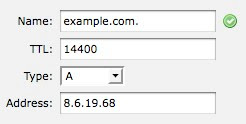
Step 2: Set up a new "A" type record like the below screen shot
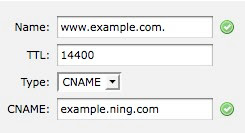
Step 3: Set up a new "CNAME" type record like the below screen shot
Now access the "www.example.com" site or "example.com" site and it should point to your ning page. Depending on the set TTL, it might take a while for the new mapping to refresh. You can try to flush your DNS cache using the steps from this site
http://www.tech-faq.com/how-to-flush-dns.html
http://helpdesk.hostmonster.com/index.php/kb/article/000559
click on the DNS editor link and choose the "example.com" from the "Select a Domain" dropdown list.
Take a screenshot of the current settings (in case you screw up you can always restore it to what it was earlier using the screenshot)
Step 1: Delete any current "A" type record with name "example.com."
Step 2: Set up a new "A" type record like the below screen shot

Step 3: Set up a new "CNAME" type record like the below screen shot

Now access the "www.example.com" site or "example.com" site and it should point to your ning page. Depending on the set TTL, it might take a while for the new mapping to refresh. You can try to flush your DNS cache using the steps from this site
http://www.tech-faq.com/how-to-flush-dns.html
Thursday, July 15, 2010
Hadoop HDFS Error: java.io.IOException: Could not complete write to file
We recently have been seeing this error in our hadoop name node logs quite a bit.
Further researching, we found that a new map/reduce job was deployed recently that merges daily files. The errors pretty much started showing up after this job was deployed and is cron to run every day. This job takes a bunch of small files as input and merges them to create a merged compressed file. In the process of creating the merging compressed file, it creates a temp file with merged content, verifies the file and then compresses it to a final file after which it deletes the temp file. Errors were being thrown when the temp file was getting deleted. Certain times delete was happening (meta data on namenode) before the file was replicated to all nodes and that was throwing this error. Currently the HDFS API does not provide a way to synchronouos method to wait till file is replicated.
To resolve this, we started using the HDFS trash functionality. HDFS best practices suggests "Enable HDFS trash, and avoid programmatic deletes - prefer the trash facility."If trash is enabled (and, it should be noted, by default it is not), files that are deleted using the Hadoop filesystem shell are moved into a special hidden trash directory, rather than being deleted immediately. The trash directory is deleted periodically by the system. Any files that are mistakenly deleted can be recovered manually by moving them out of the trash directory. The trash deletion period is configurable. The trash facility is a user level feature, it is not used when programmatically deleting files. As a best practice it is recommended considering moving data to be deleted to the trash directory (to be deleted by the system after the given time), rather than doing an immediate delete.
We changed the code to move to trash instead of deleting the code and that resolved the errors in the logs. Below is a common utility method we use across our code base when moving files.
2010-06-14 05:15:30,428 WARN org.apache.hadoop.hdfs.StateChange: DIR*
 NameSystem.completeFile: failed to complete {filename} because dir.getFileBlocks() is null and pendingFile is null
java.io.IOException: Could not complete write to file {filename} by DFSClient_-44010819
java.io.IOException: Could not complete write to file {filename} by DFSClient_-44010819
 at org.apache.hadoop.hdfs.server.namenode.NameNode.complete(NameNode.java:497)
 at sun.reflect.GeneratedMethodAccessor16.invoke(Unknown Source)
 at sun.reflect.DelegatingMethodAccessorImpl.invoke(DelegatingMethodAccessorImpl.java:25)
 at java.lang.reflect.Method.invoke(Method.java:597)
 at org.apache.hadoop.ipc.RPC$Server.call(RPC.java:512)
 at org.apache.hadoop.ipc.Server$Handler$1.run(Server.java:966)
 at org.apache.hadoop.ipc.Server$Handler$1.run(Server.java:962)
 at java.security.AccessController.doPrivileged(Native Method)
Further researching, we found that a new map/reduce job was deployed recently that merges daily files. The errors pretty much started showing up after this job was deployed and is cron to run every day. This job takes a bunch of small files as input and merges them to create a merged compressed file. In the process of creating the merging compressed file, it creates a temp file with merged content, verifies the file and then compresses it to a final file after which it deletes the temp file. Errors were being thrown when the temp file was getting deleted. Certain times delete was happening (meta data on namenode) before the file was replicated to all nodes and that was throwing this error. Currently the HDFS API does not provide a way to synchronouos method to wait till file is replicated.
To resolve this, we started using the HDFS trash functionality. HDFS best practices suggests "Enable HDFS trash, and avoid programmatic deletes - prefer the trash facility."If trash is enabled (and, it should be noted, by default it is not), files that are deleted using the Hadoop filesystem shell are moved into a special hidden trash directory, rather than being deleted immediately. The trash directory is deleted periodically by the system. Any files that are mistakenly deleted can be recovered manually by moving them out of the trash directory. The trash deletion period is configurable. The trash facility is a user level feature, it is not used when programmatically deleting files. As a best practice it is recommended considering moving data to be deleted to the trash directory (to be deleted by the system after the given time), rather than doing an immediate delete.
We changed the code to move to trash instead of deleting the code and that resolved the errors in the logs. Below is a common utility method we use across our code base when moving files.
import org.apache.hadoop.conf.Configuration;
import org.apache.hadoop.fs.Path;
import org.apache.hadoop.fs.Trash;

public static void moveToTrash(Configuration conf,Path path) throws IOException
{
     Trash t=new Trash(conf);
     boolean isMoved=t.moveToTrash(path);
     if(!isMoved)
     {
 logger.error("Trash is not enabled or file is already in the trash.");
     }
}
Tuesday, July 06, 2010
Hadoop error logs: org.apache.hadoop.hdfs.server.datanode.BlockAlreadyExistsException
2010-06-06 23:28:04,195 ERROR org.apache.hadoop.hdfs.server.datanode.DataNode:
 DatanodeRegistration(10.13.53.128:50010, storageID=DS-1219700830-127.0.0.1-50010-1266876153854,
infoPort=50075, ipcPort=50020):DataXceiver
org.apache.hadoop.hdfs.server.datanode.BlockAlreadyExistsException: Block
 blk_-7647836931304231161_18783 is valid, and cannot be written to.
    at org.apache.hadoop.hdfs.server.datanode.FSDataset.writeToBlock(FSDataset.java:1069)
    at org.apache.hadoop.hdfs.server.datanode.BlockReceiver.(BlockReceiver.java:98)
    at org.apache.hadoop.hdfs.server.datanode.DataXceiver.writeBlock(DataXceiver.java:259)
    at org.apache.hadoop.hdfs.server.datanode.DataXceiver.run(DataXceiver.java:103)
    at java.lang.Thread.run(Thread.java:619)
Most of the research online pointed to an issue with the open file limit on the cluster instances. Did some analysis and found below
-- current open files [sudhirv@hadoop-cluster-2 ~]$ sudo /usr/sbin/lsof | wc -l
1662

-- allowed open file limit cutoff
[hadoop@hadoop-cluster-2 ~]$ ulimit -n
1024
As per the Pro Hadoop book Pg 112 "Hadoop Core uses large numbers of file descriptors for MapReduce, and the DFSClient uses a large number of file descriptors for communicating with the HDFS NameNode and DataNode server processes. Looking at the below commands I see the current open file descriptors greater than set file limit. Most sites immediately bump up the number of file descriptors to 64,000, and large sites, or sites that have MapReduce jobs that open many files, might go higher."
See reference links below to find more suggestions
Decided to set the limit to 8192 and monitor the logs. Modified the open file limit on all hadoop cluster boxes to 8192. Monitored the logs for a few days and we don't see the error anymore.
[root@hadoop-cluster-1 ~]# ulimit -Hn
8192
[root@hadoop-cluster-1 ~]# ulimit -Sn
8192
References:
http://webcache.googleusercontent.com/search?q=cache:sFLquGtEMNEJ:osg-test2.unl.edu/documentation/hadoop/hadoop-installation+hadoop+file+limits&hl=en&client=firefox-a&gl=us&strip=1
Friday, June 04, 2010
simple script to monitor hadoop daemon logs for errors and warning
#!/bin/sh
check_daemons=$1
log_dir=/var/log/hadoop
warn_file=/tmp/warnings.txt
emails="{email to send errors}"

rm -f /tmp/warnings.txt

for log_file in namenode jobtracker secondarynamenode datanode tasktracker
  do
     echo "$check_daemons" | grep -qw "$log_file"
     if [[ $? -eq 0 ]] ; then
            echo -e "\n --------------------- $log_file errors and warning ------------------ \n" >> $warn_file
            cat $log_dir/hadoop-hadoop-$log_file-`hostname`.log.`date -d "1 day ago" +%Y-%m-%d`
| egrep -v 'Checkpoint done' | egrep -A 10 'WARN|ERROR' >> $warn_file
     fi
done

error_line_count=`cat /tmp/warnings.txt | egrep -v "datanode errors and warning" |
 egrep -v "tasktracker errors and warning" | egrep -v "jobtracker errors and warning"
 | egrep -v "namenode errors and warning" | egrep -v "secondarynamenode errors and warning" | egrep -v "^$" | wc -l`

if [ $error_line_count != 0 ] ; then
   mail -s "`hostname` node errors and warnings" $emails < $warn_file
fi
The script can be cronned and it checks the logs from yesterday. You can easily modify the script for standalone runs for any specific dates
Usage:
For a node running namenode, jobtracker run script as
sh get_errors.sh namenode,jobtracker
For a node running datanode, tasktracker run script as
sh get_errors.sh datanode,tasktracker
Thursday, May 27, 2010
Updating Cloudera Hadoop To Latest Patch On CentOS
Warning: Below steps should only be used when updating Hadoop within the same major version. For instance updates like 0.20.1+169.56 to 0.20.1+169.88. When upgrading (example going from 0.20 to 0.21) these steps should not be used.
We have a small cluster in place so the below steps works for us. Bigger cluster nodes will need a more automated way.
Here are the step by step instructions. Ensure no map/reduce jobs/HDFS data write jobs are running.
Step 1: Create a screen session on all hadoop nodes
Step 2: Prepare for any disaster that might happen
On the master node where NameNode is current running, take a latest checkpoint in case things go wrong. This will serve as last image to recover from if things go wrong. To take a manual checkpoint, you need to enter safemode. See below for series of commands to do that.
Step 3: Log the current hadoop version and configurations versions. The hadoop version will change after update. The configurations version should still stay the same.
Step 4: Shutdown hadoop services on the node. Check to ensure services are turned off. It is recommended to start with nodes that host the Name Node and Job Tracker first as mismatch in versions between NN,JT and DN,TT won't work in most cases.
Step 5: Check to ensure the new hadoop update patch shows up in the yum update list. If not then you would need to configure the repo correctly
Step 5: Run the update
Step 6: Check updated version to ensure update was performed and that config alternatives were not changed
Step 7: Start the hadoop services on the node and tail logs to ensure no errors are being reported.
We have a small cluster in place so the below steps works for us. Bigger cluster nodes will need a more automated way.
Here are the step by step instructions. Ensure no map/reduce jobs/HDFS data write jobs are running.
Step 1: Create a screen session on all hadoop nodes
Step 2: Prepare for any disaster that might happen
On the master node where NameNode is current running, take a latest checkpoint in case things go wrong. This will serve as last image to recover from if things go wrong. To take a manual checkpoint, you need to enter safemode. See below for series of commands to do that.
- check current mode
[sudhirv@hadoop-cluster-3 bin]$ hadoop dfsadmin -safemode get
Safe mode is OFF

- enter safe mode
[sudhirv@hadoop-cluster-3 bin]$ hadoop dfsadmin -safemode enter
Safe mode is ON

- check safe mode is ON
[sudhirv@hadoop-cluster-3 bin]$ hadoop dfsadmin -safemode get
Safe mode is ON

- run manual checkpoint
[sudhirv@hadoop-cluster-1 ~]$ hadoop dfsadmin -saveNamespace

-- ensure a checkpoint was taken by looking at image timestamp
[sudhirv@hadoop-cluster-1 ~]$ ls -ltr /var/lib/hadoop-0.20/cache/hadoop/dfs/name/image
total 4
-rw-rw-r-- 1 hadoop hadoop 157 May 26 16:49 fsimage

- leave safe mode
[sudhirv@hadoop-cluster-1 ~]$ hadoop dfsadmin -safemode leave
Safe mode is OFF

- confirm safe mode is off
[sudhirv@hadoop-cluster-1 ~]$ hadoop dfsadmin -safemode get
Safe mode is OFF
Step 3: Log the current hadoop version and configurations versions. The hadoop version will change after update. The configurations version should still stay the same.
sudo su -

[root@hadoop-cluster-3 ~]$ hadoop version
Hadoop 0.20.1+169.56
Subversion  -r 8e662cb065be1c4bc61c55e6bff161e09c1d36f3
Compiled by root on Tue Feb  9 13:40:08 EST 2010

[root@hadoop-cluster-3 ~]# alternatives --display hadoop-0.20-conf
hadoop-0.20-conf - status is auto.
 link currently points to /etc/hadoop-0.20/conf.cluster
/etc/hadoop-0.20/conf.empty - priority 10
/etc/hadoop-0.20/conf.pseudo - priority 30
/etc/hadoop-0.20/conf.cluster - priority 50
Current `best' version is /etc/hadoop-0.20/conf.cluster.
Step 4: Shutdown hadoop services on the node. Check to ensure services are turned off. It is recommended to start with nodes that host the Name Node and Job Tracker first as mismatch in versions between NN,JT and DN,TT won't work in most cases.
Step 5: Check to ensure the new hadoop update patch shows up in the yum update list. If not then you would need to configure the repo correctly
yum list updates
Step 5: Run the update
sudo su -
[root@hadoop-cluster-3 ~]# yum update hadoop-0.20
Step 6: Check updated version to ensure update was performed and that config alternatives were not changed
[root@hadoop-cluster-3 ~]# hadoop version
Hadoop 0.20.1+169.88
Subversion  -r ded54b29979a93e0f3ed773175cafd16b72511ba
Compiled by root on Thu May 20 22:22:39 EDT 2010

[root@hadoop-cluster-3 ~]# alternatives --display hadoop-0.20-conf
hadoop-0.20-conf - status is auto.
 link currently points to /etc/hadoop-0.20/conf.cluster
/etc/hadoop-0.20/conf.empty - priority 10
/etc/hadoop-0.20/conf.pseudo - priority 30
/etc/hadoop-0.20/conf.cluster - priority 50
Current `best' version is /etc/hadoop-0.20/conf.cluster.
Step 7: Start the hadoop services on the node and tail logs to ensure no errors are being reported.
Wednesday, May 19, 2010
HDFS Relative path error when running map/reduce jobs
Recently while running a map reduce we encountered this error
The job tracker and task tracker logs continuously kept failing across many retry attempts and continuously were dumping this error in the logs. Here's the code part that throws the error.
Researched this for quite a while and finally found this excerpt from the Pro Hadoop book "An example of an HDFS URI is hdfs://NamenodeHost[:8020]/. The file system protocol is hdfs, the host to contact for services is NamenodeHost, and the port to connect to is 8020, which is the default port for HDFS. If the default 8020 port is used, the URI may be simplified as hdfs://NamenodeHost/. This value may be altered by individual jobs. You can choose an arbitrary port for the hdfs NameNode."
Currently our "fs.default.name" parameter in core-site.xml file is set to "hdfs://hadoop-master.ic:8020". Based on the above text I went ahead and removed the default port from the parameter and restarted the name node. Ran your job again and voila!!! works now.
java.io.IOException: Can not get the relative path:
base = hdfs://hadoop-master:8020/5/_temporary/_attempt_201005150057_0006_r_000000_0
 child = hdfs://hadoop-master/5/_temporary/_attempt_201005150057_0006_r_000000_0/part-r-00000
at org.apache.hadoop.mapreduce.lib.output.FileOutputCommitter.getFinalPath(FileOutputCommitter.java:200)
at org.apache.hadoop.mapreduce.lib.output.FileOutputCommitter.moveTaskOutputs(FileOutputCommitter.java:146)
at org.apache.hadoop.mapreduce.lib.output.FileOutputCommitter.moveTaskOutputs(FileOutputCommitter.java:165)
at org.apache.hadoop.mapreduce.lib.output.FileOutputCommitter.commitTask(FileOutputCommitter.java:118)
at org.apache.hadoop.mapred.Task.commit(Task.java:779)
at org.apache.hadoop.mapred.Task.done(Task.java:691)
at org.apache.hadoop.mapred.ReduceTask.run(ReduceTask.java:414)
at org.apache.hadoop.mapred.Child.main(Child.java:170)
The job tracker and task tracker logs continuously kept failing across many retry attempts and continuously were dumping this error in the logs. Here's the code part that throws the error.
Researched this for quite a while and finally found this excerpt from the Pro Hadoop book "An example of an HDFS URI is hdfs://NamenodeHost[:8020]/. The file system protocol is hdfs, the host to contact for services is NamenodeHost, and the port to connect to is 8020, which is the default port for HDFS. If the default 8020 port is used, the URI may be simplified as hdfs://NamenodeHost/. This value may be altered by individual jobs. You can choose an arbitrary port for the hdfs NameNode."
Currently our "fs.default.name" parameter in core-site.xml file is set to "hdfs://hadoop-master.ic:8020". Based on the above text I went ahead and removed the default port from the parameter and restarted the name node. Ran your job again and voila!!! works now.
Sunday, May 02, 2010
Fluid app when signin opens default browser
I am big fan of Fluid and use it for creating apps for most of my email/social sites. I have also one created for Campfire which I use to communicate with my team. Recently my Campfire app stopped working (not sure if this happened after I upgraded to newer Fluid version or whether the Campfire dev started using a single signon servide ) in the sense then when I click on 'Signin' it was opening my default browser and forwarding me to "https://launchpad.37signals.com/signin". On further googling found that this was happening because the campfire fluid app did not have permission to allow other site domains meaning the signin process was forwarding to a different domain than the campfire specific domain. For instance my campfire domain is "https://icrossing.campfirenow.com" and signin would redirect to "https://launchpad.37signals.com/signin" for authentication. To make it work all it needed was to set the app permission to allow browsing to other domains and that made it work.
Go to fluid app -> preferences -> Advanced and enable the below option

Go to fluid app -> preferences -> Advanced and enable the below option

Subscribe to:
Posts (Atom)