So this morning we faced a slave issue (duplicate entry) due to bin log corruption (slave machine unexpectedly died and on reboot had a corrupt table that was causing the duplicate entry error on replicated insert statements). After trying everything to resolve the issue, we ended up with deciding to scrap the slave table and copy the table new from Master. In order to do that we still needed to solve this slave issue and get the slave going and some later time do the master to slave copy. We decided to empty the current slave table and let the slave run however the issue was that this Master - Slave setup is actually a Master <-> Master setup and delete statement wud be replicated to master and we didn't want that. Ideally we wanted the delete statement in this case to not replicate. We achieved this by setting the 'sql_log_bin' session variable to 0 before running the delete statement. Since this is a session based variable it only affects the current session (we tested to make sure. see below). So the steps were
- open a new mysql session with a user that has SUPER privileges
- confirm sql_log_bin is set to 1 using comment "select @@sql_log_bin;"
- set the sql_log_bin to 0 using command "set sql_log_bin=0;"
- confirm variable is correctly set using command "select @@sql_log_bin;"
- run the statements that you don't want replicated
- Quit the mysql client session
Testing to ensure its really session based :)
############## Session 1 #############################
mysql> select @@sql_log_bin;
+---------------+
| @@sql_log_bin |
+---------------+
| 1 |
+---------------+
1 row in set (0.00 sec)
mysql> set sql_log_bin=0;
Query OK, 0 rows affected (0.00 sec)
mysql> select @@sql_log_bin;
+---------------+
| @@sql_log_bin |
+---------------+
| 0 |
+---------------+
1 row in set (0.00 sec)
############## Session 2 #############################
mysql> select @@sql_log_bin;
+---------------+
| @@sql_log_bin |
+---------------+
| 1 |
+---------------+
1 row in set (0.00 sec)
Friday, February 19, 2010


Tuesday, February 09, 2010
Setting up passwordless access on CentOs 5
This has been detailed in various places however the part about setting the right permissions on the .ssh entries made it work for. Here's a step by step procedure
- Generate the keys
ssh-keygen -t rsa -P ""
- copy the key to authorized keys
cat $HOME/.ssh/id_rsa.pub >> $HOME/.ssh/authorized_keys
- ensure only the user has read/write/execute permission on the .ssh dir
chmod 700 $HOME/.ssh
- ensure only the user has read/write permission on authorized keys file
chmod 600 $HOME/.ssh/authorized_keys
- Generate the keys
ssh-keygen -t rsa -P ""
- copy the key to authorized keys
cat $HOME/.ssh/id_rsa.pub >> $HOME/.ssh/authorized_keys
- ensure only the user has read/write/execute permission on the .ssh dir
chmod 700 $HOME/.ssh
- ensure only the user has read/write permission on authorized keys file
chmod 600 $HOME/.ssh/authorized_keys
Thursday, January 14, 2010
Thoughtworks webinars on Distributed Agile Teams
Attended a pretty educational 2 part series from Thoughtworks on distributed agile teams focussing on communication and facilitating agile meetings. Must watch. designed to address the concerns and risks that come with communicating effectively on a distributed project. The goal of this series is to provide immediate support and detailed suggestions to project teams struggling to work in a distributed environment.
Can you hear me now? Good . . .
Part 1: Remove Barriers to Communication : Mark Rickmeier reviews and rates the best-of-breed tools that address the key communication challenges faced with distributed development. We will evaluate a variety of tools and what they can do for your project, including: Instant messenger/chat tools, desktop sharing, VOIP, Web conferencing, Wiki/collaboration, issue/task tracking, and application lifecycle management.
Part 2: Facilitating Distributed Agile Meetings : This series builds on the tool recommendations from Part 1 to focus on process and innovations used by effective project teams to facilitate four typical Agile meetings between remote locations: Distributed release planning sessions, distributed iteration planning meetings, distributed stand ups, and distributed retrospectives.
Can you hear me now? Good . . .
Part 1: Remove Barriers to Communication : Mark Rickmeier reviews and rates the best-of-breed tools that address the key communication challenges faced with distributed development. We will evaluate a variety of tools and what they can do for your project, including: Instant messenger/chat tools, desktop sharing, VOIP, Web conferencing, Wiki/collaboration, issue/task tracking, and application lifecycle management.
Part 2: Facilitating Distributed Agile Meetings : This series builds on the tool recommendations from Part 1 to focus on process and innovations used by effective project teams to facilitate four typical Agile meetings between remote locations: Distributed release planning sessions, distributed iteration planning meetings, distributed stand ups, and distributed retrospectives.
Tuesday, December 29, 2009
Reverting a deleted file in Subversion
Last week I accidently a file from the SVN repo and had to revert the delete. Here's a procedure to
1. Do a svn log on the directory where the file used to exist. That will show the deleted file commit action
2. So the above file needs to be reverted. Get the previous version of the file to working copy.
3. Doing a SVN status will now show that there is a file waiting to be added to the rep with previous history. Quoted from the book "The plus sign in the status output indicates that the item isn't merely scheduled for addition, but scheduled for addition “with history”. Subversion remembers where it was copied from. In the future, running svn log on this file will traverse back through the file's resurrection and through all the history it had prior to revision 1438. In other words, this new MSNCreativeTransformByAdId.pm isn't really new; it's a direct descendant of the original, deleted file."
4. Use the svn commit to commit the file.
1. Do a svn log on the directory where the file used to exist. That will show the deleted file commit action
bash> svn log --verbose

deleting MSN creative change
------------------------------------------------------------------------
r1438 | sudhirv | 2009-12-28 15:13:46 -0800 (Mon, 28 Dec 2009) | 1 line
Changed paths:
   D /trunk/lib/ETL/Transform/MSNCreativeTransformByAdId.pm
2. So the above file needs to be reverted. Get the previous version of the file to working copy.
bash> svn copy --revision 1437 \
http://somecompany.com/svn/trunk/lib/ETL/Transform/MSNCreativeTransformByAdId.pm MSNCreativeTransformByAdId.pm
3. Doing a SVN status will now show that there is a file waiting to be added to the rep with previous history. Quoted from the book "The plus sign in the status output indicates that the item isn't merely scheduled for addition, but scheduled for addition “with history”. Subversion remembers where it was copied from. In the future, running svn log on this file will traverse back through the file's resurrection and through all the history it had prior to revision 1438. In other words, this new MSNCreativeTransformByAdId.pm isn't really new; it's a direct descendant of the original, deleted file."
bash> $ svn status
A  +   MSNCreativeTransformByAdId.pm
4. Use the svn commit to commit the file.
bash> svn commit -m "reverting delete to revision 1437" MSNCreativeTransformByAdId.pm
Wednesday, December 16, 2009
Mysql backups using LVM snapshots
Logical Volume Manager (LVM) provides the ability to take a snapshot of any logical volume for the purpose of obtaining a backup of a partition in a consistent state. As applications may access files or databases on a partition during a backup some files may be backed up in one state, while later files are backed up after an update has been made, leading to an inconsistent backup. Traditionally the solution has been to mount the partition read-only, apply table-level write locks to databases or shut down the database engine etc.; all measures which adversely impact availability (but not as much as data loss without a backup will). With LVM snapshots it is possible to obtain a consistent backup without compromising availability. The LVM snapshot works by logging the changes to the filesystem to the snapshot partition, rather than mirroring the partition. Thus when you create a snapshot partition you do not need to use space equal to the size of the partition that you are taking a snapshot of, but rather the amount of changes that it will undergo during the lifetime of the snapshot. This is a function of both how much data is being written to the partition and also how long you intend keeping the LVM snapshot. The longer you leave it, the more changes there are likely to be on the file system and the more the snapshot partition will fill up with change information. The higher the rate of change on the partition the shorter the lifespan of the snapshot. If the amount of changes on the LVM partition exceed the size of the snapshot then the snapshot is released. Step by step procedure to backup using snapshot
1. Connect to MySQL and run FLUSH TABLES WITH READ LOCK
2. While holding connection open run: lvcreate -L16G -s -n dbbackup /dev/Main/Data – This will create snapshot named dbbackup for Logical Volume Main/Data . You should specify enough of undo space to hold modifications during backup process – I’ve specified 16GB in this case. If your undo size is not large enough snapshot will get invalidated and backup will be aborted.
3. Snapshot created, now you want to let MySQL Server to continue, which is done by running UNLOCK TABLES or simply closing connection.
4. Mount backup Filesystem: mount /dev/Main/dbbackup /mnt/backup
5. Copy the data from the above mount to tape or any other source
6. Unmount filesystem umount /mnt/backup
7. Remove snapshot: lvremove -f /dev/Main/dbbackup
So how does the LVM snapshot work internally. LVM snapshots are an example of a copy-on-write snapshot solution. When you have an LVM volume with no snapshots, writes to the volume happen as you’d expect. A block is changed, and that’s it. So in the above case before the snapshot is created, any db inserts/updates that causes a write IO is normally written to the data directory. As soon as you create a snapshot, LVM creates a pool of blocks. I believe that this pool also contains a full copy of the metadata (only metadata not the full data) of the volume. When writes happen to the main volume (i.e. the directory off of which snapshot is created), the block being overwritten is copied to this new pool and the new block is written to the main volume. This is the ‘copy-on-write’. Because of this, the more data that gets changed between when a snapshot was taken and the current state of the main volume, the more space will get consumed by that snapshot pool. The normal way that LVM snapshots are used is not for long-term storage, but rather to get a consistent “picture” of the filesystem such that a backup can be taken. Once the backup is done, the snapshot is discarded. When you mount the snapshot, the meta-data written when the snapshot was taken allows the directory tree to be presented. Blocks that haven’t been changed since the snapshot was taken are read directly from the main volume. Blocks that have been changed are read from the snapshot pool. You don’t want to leave snapshots laying around because (a) they’ll fill up and become unusable, and (b) the system’s performance is impacted while a snapshot is active– things get slower.
1. Connect to MySQL and run FLUSH TABLES WITH READ LOCK
2. While holding connection open run: lvcreate -L16G -s -n dbbackup /dev/Main/Data – This will create snapshot named dbbackup for Logical Volume Main/Data . You should specify enough of undo space to hold modifications during backup process – I’ve specified 16GB in this case. If your undo size is not large enough snapshot will get invalidated and backup will be aborted.
3. Snapshot created, now you want to let MySQL Server to continue, which is done by running UNLOCK TABLES or simply closing connection.
4. Mount backup Filesystem: mount /dev/Main/dbbackup /mnt/backup
5. Copy the data from the above mount to tape or any other source
6. Unmount filesystem umount /mnt/backup
7. Remove snapshot: lvremove -f /dev/Main/dbbackup
So how does the LVM snapshot work internally. LVM snapshots are an example of a copy-on-write snapshot solution. When you have an LVM volume with no snapshots, writes to the volume happen as you’d expect. A block is changed, and that’s it. So in the above case before the snapshot is created, any db inserts/updates that causes a write IO is normally written to the data directory. As soon as you create a snapshot, LVM creates a pool of blocks. I believe that this pool also contains a full copy of the metadata (only metadata not the full data) of the volume. When writes happen to the main volume (i.e. the directory off of which snapshot is created), the block being overwritten is copied to this new pool and the new block is written to the main volume. This is the ‘copy-on-write’. Because of this, the more data that gets changed between when a snapshot was taken and the current state of the main volume, the more space will get consumed by that snapshot pool. The normal way that LVM snapshots are used is not for long-term storage, but rather to get a consistent “picture” of the filesystem such that a backup can be taken. Once the backup is done, the snapshot is discarded. When you mount the snapshot, the meta-data written when the snapshot was taken allows the directory tree to be presented. Blocks that haven’t been changed since the snapshot was taken are read directly from the main volume. Blocks that have been changed are read from the snapshot pool. You don’t want to leave snapshots laying around because (a) they’ll fill up and become unusable, and (b) the system’s performance is impacted while a snapshot is active– things get slower.
Wednesday, November 04, 2009
Hibernate flush only specific object types
So we have this issue where in certain cases we would only like to flush a certain class of objects and discard the rest. This is sort of a common use case if you are following the one session per request paradigm wherein if a job/request fails and the job status logging is also done via the database/hibernate then you would still want to persist the job log status however the application job data changes can be discarded. Found an excellent post here:
https://forum.hibernate.org/viewtopic.php?f=1&t=983747&sid=4988e082644059b66220836ef4c53806&start=15
So as it turns out there is no way to selectively flush objects. You can use the "evict non flushable objects" methodology (basically bu evicting the objects their changes are discarded) but often times you don't know what all objects were involved in the request.
A better design is to probably open two sessions with each request/job. One for meta data and the other for application business data. That allows better handling of request failures.
https://forum.hibernate.org/viewtopic.php?f=1&t=983747&sid=4988e082644059b66220836ef4c53806&start=15
So as it turns out there is no way to selectively flush objects. You can use the "evict non flushable objects" methodology (basically bu evicting the objects their changes are discarded) but often times you don't know what all objects were involved in the request.
A better design is to probably open two sessions with each request/job. One for meta data and the other for application business data. That allows better handling of request failures.
Sunday, October 04, 2009
Enable Mysql general query log in Mac OSX
To enable this for the current user follow the below steps
-- create or edit the existing cnf file
vim ~/.my.cnf
-- add the below variable to the file
[server]
log=/tmp/mysql_query.log
-- restart mysql
sudo /Library/StartupItems/MySQLCOM/MySQLCOM stop
sudo /Library/StartupItems/MySQLCOM/MySQLCOM start
To enable the general query log for all users add the "variable" to /etc/my.cnf instead.
-- create or edit the existing cnf file
vim ~/.my.cnf
-- add the below variable to the file
[server]
log=/tmp/mysql_query.log
-- restart mysql
sudo /Library/StartupItems/MySQLCOM/MySQLCOM stop
sudo /Library/StartupItems/MySQLCOM/MySQLCOM start
To enable the general query log for all users add the "variable" to /etc/my.cnf instead.
Sunday, August 30, 2009
Adobe Flash freezes on full screen
Have been having this problem recently wherein doing a full screen on a flash video freezes the screen. My wife watches movies online occasionally on MegaVideo/Veoh and the problem persists in both as both use flash internally.
While the Flash player is in normal mode, right click on the player and choose "Settings" from the context menu. Remove the checkmark in the box next to "Enable Hardware Acceleration".

Reference links
http://support.mozilla.com/si/kb/Cannot+view+full+screen+Flash+videos
http://www.macromedia.com/support/documentation/en/flashplayer/help/help01.html
While the Flash player is in normal mode, right click on the player and choose "Settings" from the context menu. Remove the checkmark in the box next to "Enable Hardware Acceleration".

Reference links
http://support.mozilla.com/si/kb/Cannot+view+full+screen+Flash+videos
http://www.macromedia.com/support/documentation/en/flashplayer/help/help01.html
Friday, August 14, 2009
Adcenter keyword: Setting match type
Adcenter is different from other networks as it does not have a special attribute called “match type” on a keyword. Instead each keyword has three bid fields “exact bid (EB)”, “phrase bid (PB)” and “broad bid (BB)”. The keyword match types are determined on whether a bid is specified for that match type. For instance if a keyword has EB=1.5,PB=0.75,BB=0.0 then this keyword is used in exact and phrase matches. This is different in other networks where a keyword has a single “bid” attribute and an attribute to specify match type.
Friday, August 07, 2009
Monitoring Gearman over telnet port 4730
So the only way to monitor Gearman is via doing a telnet to port 4730. The current monitoring supported commands are fairly basic. I could not locate any documentation on the support commands so had to literally look at the code to figure out the supported commands (the below command documentation is copied from the comments in code). There are plans to include more set of commands in the next release.
Command: STATUS
The output format of this function is tab separated columns as follows, followed by a line consisting of a full stop and a newline (".\n") to indicate the end of output. below are the columns shown
- Function name : A string denoting the name of the function of the job
- Number in queue : A positive integer indicating the total number of jobs for this function in the queue. This includes currently running ones as well (next column)
- Number of jobs running : A positive integer showing how many jobs of this function are currently running
- Number of capable workers : A positive integer denoting the maximum possible count of workers that could be doing this job. Though they may not all be working on it due to other tasks holding them busy.
Command : Workers
This command show the details of various clients registered with the gearmand server. For each worker it shows the following info:
- Peer IP: Client remote host
- Client ID: Unique ID assigned to client
- Functions: List of functions this client has registered for.
Any other command text throws a error "ERR unknown_command Unknown+server+command"
Command: STATUS
The output format of this function is tab separated columns as follows, followed by a line consisting of a full stop and a newline (".\n") to indicate the end of output. below are the columns shown
- Function name : A string denoting the name of the function of the job
- Number in queue : A positive integer indicating the total number of jobs for this function in the queue. This includes currently running ones as well (next column)
- Number of jobs running : A positive integer showing how many jobs of this function are currently running
- Number of capable workers : A positive integer denoting the maximum possible count of workers that could be doing this job. Though they may not all be working on it due to other tasks holding them busy.
Command : Workers
This command show the details of various clients registered with the gearmand server. For each worker it shows the following info:
- Peer IP: Client remote host
- Client ID: Unique ID assigned to client
- Functions: List of functions this client has registered for.
Any other command text throws a error "ERR unknown_command Unknown+server+command"
sudhirv@sudhirv:~$ telnet localhost 4730
Trying ::1...
Trying 127.0.0.1...
Connected to localhost.
Escape character is '^]'.

STATUS
.
WORKERS
11 127.0.0.1 - :
.
status
.
workers
11 127.0.0.1 - :
.
some crap
ERR unknown_command Unknown+server+command

#### will add more samples in action when I have this thing up and running ####
Installing Gearman on Ubuntu
Gearman is a open source job forking system. We have been evaluating its use in our project to share jobs across components. More info on the Gearman project can be found here: http://gearman.org/.
Here are the instructions on installing Gearman on Ubuntu
Here are the instructions on installing Gearman on Ubuntu
wget http://launchpad.net/gearmand/trunk/0.9/+download/gearmand-0.9.tar.gz
tar -xvzf gearmand-0.9.tar.gz

# two missing libraries that found at configure time
sudo apt-get install libevent-dev
sudo apt-get install uuid-dev

cd gearmand-0.9
./configure
make
sudo make install
sudo ldconfig

# start gearman
gearmand &

# check gearmand running
ps auxw | grep [g]earmand

# check germand listening for jobs on tcp port 4730
sudo lsof -i tcp:4730


# errors when starting gearman
Error: gearman: error while loading shared libraries: libgearman.so.1

Solution: `make install` may install libraries into `/usr/local/lib`.  It's possible
 that this directory isn't on your library search path, which will result in an error
like: "gearman: error while loading shared libraries: libgearman.so.1."  To fix this,
either add `/usr/local/lib` to `LD_LIBRARY_PATH`, or modify `/etc/ld.so.conf` or
`/etc/ld.so.conf.d` to add `/usr/local/lib`, then run: sudo ldconfig
Extract process attributes
Handy one liner scripts to extract various process attributes. You can add additional attributes to the 'ps' command to get other attributes. Below are some samples
-- Process start hour
ps -eo pgid,lstart,cmd | grep "[p]name" | awk '{print $5}' | cut -d\. -f1
-- Process start minute
ps -eo pgid,lstart,cmd | grep "[p]name" | awk '{print $5}' | cut -d\. -f2
--process start day
ps -eo pgid,lstart,cmd | grep "[p]name" | awk '{print $4}'
-- Process start hour
ps -eo pgid,lstart,cmd | grep "[p]name" | awk '{print $5}' | cut -d\. -f1
-- Process start minute
ps -eo pgid,lstart,cmd | grep "[p]name" | awk '{print $5}' | cut -d\. -f2
--process start day
ps -eo pgid,lstart,cmd | grep "[p]name" | awk '{print $4}'
command to kill a process group
If pid is negative but not -1, the signal is sent to all processes whose process group ID is equal to the absolute value of pid. The negative pid is specified in this way:
kill -s KILL -- -nn
where nn is the process group ID and may have a range of 2 to 7 digits (nn to nnnnnnn).
kill -s KILL -- -9812753
The format must include the – – – before the nn in order to specify the process group ID
kill -s KILL -- -nn
where nn is the process group ID and may have a range of 2 to 7 digits (nn to nnnnnnn).
kill -s KILL -- -9812753
The format must include the – – – before the nn in order to specify the process group ID
Saturday, June 06, 2009
Ubuntu 9.04 resets resolution @ restart
Spent quite some time today trying to make this work. Installed Ubuntu 9.04 this AM and as expected it was not able to correctly detect the monitor resolution. Installed the latest NVidia drivers (180.44) from Synaptic package and was able to set the right resolution using "nvidia-settings" app. Before saving the configuration made sure that preview of "/etc/X11/xorg.conf" was showing as to what I had set. Restarted the system and the resolution was getting set back to "800x600". Applying a resolution using 'nvidia-settings" was still working in the session however @ logout/restart it would revert back to "800x600". Here's what all I tried and the final step that worked for me:
1) The first question I had was whether nvidia drivers were being loaded at restart or not. One of the Ubuntu knowledge base suggested adding "nvidia" to "/etc/modules" such that it gets loaded at boot time but that didn't work.
.... After many failed google searches I shifted my focus to looking at system logs for any clues......
2) checked this log file after system startup "/var/log/gdm/:0.log" and it was complaining about error loading "type2" and "freetype" modules. I wasn't sure if this was causing the "xorg.comf" to fail so I manually disabled the load of these modules in the "xorg.conf" file under the section module like below. Did a restart but still the same situation however the log "/var/log/gdm/:0.log" was not showing the error this time.
Section "Module"
Load "dbe"
Load "extmod"
# Load "type1"
# Load "freetype"
Load "glx"
EndSection
2) Check log file "/var/log/Xorg.0.log". This log contains details on "xorg.conf" loading. Watchout for any errors in this log. In my case this log looked fine except the last line in the log file that said "[nvidia]: setting resolution 800x600". This baffled me. While the earlier lines in the log file correctly stated loading the correct resolution from 'xorg.conf', this last log line almost seemed like some another process was invoking at startup that was turning the resolution back to '800x600'. Googled around but no clue.
... Took a walk at a park nearby as my brains was about to explode.
3) Lot of sites/forums had samples of "xorg.conf" files from users whose system was working fine. Tried various of those but still no luck.
4) One of the forums post suggested this method. "System --> Preferences --> Display". Choosing that option prompts a question "It appears that your graphics driver does not support the necessary extensions to use this tool. Do you want to use your graphics driver vendor's tool instead?". if you click "yes" it takes you to the "nvidia-settings" tool. If you choose the "No" option, it allows choosing a resolution via the "Display Preferences" window. I select "No" and choose the desired resolution of "1280x1024" from the list and hit "Apply". As usual it worked in the session and voila!!!! it also worked after a restart. The resolution stayed @ "1280x1024".
Obviously there were a lot of other steps that I tried in vain but these seemed worth a note as they provide some clue as to what the issue might be. Hope this post helps.
my google searched keywords: Xorg.log nvidia 800x600, Ubuntu 9.04 resets resolution restart, ubuntu 9.04 stuck at 800x600, ubuntu 9.04 low graphics mode, ubuntu 9.04 loose settings on restart, ubuntu 9.04 lost screen resolution after restart
1) The first question I had was whether nvidia drivers were being loaded at restart or not. One of the Ubuntu knowledge base suggested adding "nvidia" to "/etc/modules" such that it gets loaded at boot time but that didn't work.
.... After many failed google searches I shifted my focus to looking at system logs for any clues......
2) checked this log file after system startup "/var/log/gdm/:0.log" and it was complaining about error loading "type2" and "freetype" modules. I wasn't sure if this was causing the "xorg.comf" to fail so I manually disabled the load of these modules in the "xorg.conf" file under the section module like below. Did a restart but still the same situation however the log "/var/log/gdm/:0.log" was not showing the error this time.
Section "Module"
Load "dbe"
Load "extmod"
# Load "type1"
# Load "freetype"
Load "glx"
EndSection
2) Check log file "/var/log/Xorg.0.log". This log contains details on "xorg.conf" loading. Watchout for any errors in this log. In my case this log looked fine except the last line in the log file that said "[nvidia]: setting resolution 800x600". This baffled me. While the earlier lines in the log file correctly stated loading the correct resolution from 'xorg.conf', this last log line almost seemed like some another process was invoking at startup that was turning the resolution back to '800x600'. Googled around but no clue.
... Took a walk at a park nearby as my brains was about to explode.
3) Lot of sites/forums had samples of "xorg.conf" files from users whose system was working fine. Tried various of those but still no luck.
4) One of the forums post suggested this method. "System --> Preferences --> Display". Choosing that option prompts a question "It appears that your graphics driver does not support the necessary extensions to use this tool. Do you want to use your graphics driver vendor's tool instead?". if you click "yes" it takes you to the "nvidia-settings" tool. If you choose the "No" option, it allows choosing a resolution via the "Display Preferences" window. I select "No" and choose the desired resolution of "1280x1024" from the list and hit "Apply". As usual it worked in the session and voila!!!! it also worked after a restart. The resolution stayed @ "1280x1024".
Obviously there were a lot of other steps that I tried in vain but these seemed worth a note as they provide some clue as to what the issue might be. Hope this post helps.
my google searched keywords: Xorg.log nvidia 800x600, Ubuntu 9.04 resets resolution restart, ubuntu 9.04 stuck at 800x600, ubuntu 9.04 low graphics mode, ubuntu 9.04 loose settings on restart, ubuntu 9.04 lost screen resolution after restart
Mac OSX Burn ISO Image
Here are the steps.
1) Open Finder
2) Browse "Application/Utilities"
3) Open/double click Disk utility
4) Click "Burn" icon on top. This will ask you to choose a ISO image
5) Once selected it will ask to insert a CD and voila.
Off course its easy but when you've been using Linux and Windows utilities for years, these steps can be a little perplexing and hard to remember.
******************* screenshots **********************
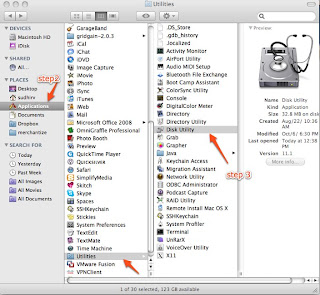
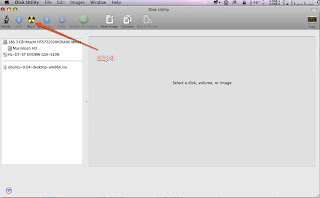
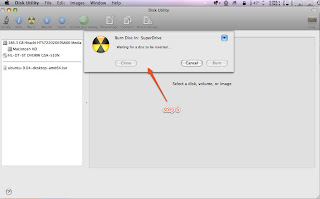
1) Open Finder
2) Browse "Application/Utilities"
3) Open/double click Disk utility
4) Click "Burn" icon on top. This will ask you to choose a ISO image
5) Once selected it will ask to insert a CD and voila.
Off course its easy but when you've been using Linux and Windows utilities for years, these steps can be a little perplexing and hard to remember.
******************* screenshots **********************


Wednesday, January 28, 2009
Perl Mysql DBI get deleted row count
Trying to capture the number of deleted rows when executing a delete statement was returning a "0E0". See below for the script details. What I found was that it was DBI's way of saying zero rows were deleted. The thing to know about DBI is that do() needs to return distinct values to distinguish the occurrence of an error from the case that no rows were affected, so it uses “undef” and “0E0”. The value “undef” indicates an error; it evaluates to false in a Boolean context. The string “0E0” indicates that no rows were affected; it evaluates to true in Boolean contexts but is treated as zero in numeric contexts. If do() returned 0 to indicate no rows were affected, that evaluates to false in a Booelan context and would be difficult from an error. You can do the following to display the row count correctly
Error:
Solution:
Error:
my $deleted = $conn->do("delete from employee where year between 1901 and 1910");
print "deleted $deleted rows.\n";

The above would print "deleted 0E0 rows"
Solution:
my $deleted = $conn->do("delete from employee where year between 1901 and 1910");
 printf "deleted %d rows.\n", $deleted;

(OR)

my $deleted += $conn->do("delete from employee where year between 1901 and 1910");
print "deleted $deleted rows.\n";
Monday, January 26, 2009
Adcenter Error Code 1514 : The Negative keywords requires partial match bid
Got this error when dealing with a keyword update through the Adcenter API. Its a shame that Microsoft has no documentation on this error and none the less anywhere on the internet, hence the drive to blog this. Here's a brief background on Adcenter Negative Keywords:
http://msdn.microsoft.com/en-us/library/bb545038.aspx
So what the error basically means is that "Negative keywords are only allowed on keywords that have a broad or phrase match bid specified". If you try to add/update a keyword with "Not Keywords" and only exact bid specified then you would get this error. In my case this was being caused by a different scenario. We use Apache Axis for our webservice calls and Axis treats a blank string as a valid content string when compared to a null string. So even if the "Not Keywords" was set to blank it was generating the "Negative Keyword" soap element. See below for SOAP source. In the soap below the broad and phrase bid is specified as 0's and the "NegativeKeywords" element is constructed making MSN think that there are negative keywords associated with this keyword and hence the error. I resolved this error by setting the string to NULL instead of a blank ("''").
http://msdn.microsoft.com/en-us/library/bb545038.aspx
So what the error basically means is that "Negative keywords are only allowed on keywords that have a broad or phrase match bid specified". If you try to add/update a keyword with "Not Keywords" and only exact bid specified then you would get this error. In my case this was being caused by a different scenario. We use Apache Axis for our webservice calls and Axis treats a blank string as a valid content string when compared to a null string. So even if the "Not Keywords" was set to blank it was generating the "Negative Keyword" soap element. See below for SOAP source. In the soap below the broad and phrase bid is specified as 0's and the "NegativeKeywords" element is constructed making MSN think that there are negative keywords associated with this keyword and hence the error. I resolved this error by setting the string to NULL instead of a blank ("''").
<?xml version="1.0" encoding="UTF-8"?>
<soapenv:Envelope xmlns:soapenv="http://schemas.xmlsoap.org/soap/envelope/" xmlns:xsd="http://www.w3.org/2001/XMLSchema" xmlns:xsi="http://www.w3.org/2001/XMLSchema-instance">
<soapenv:Header><ns1:ApplicationToken soapenv:actor="http://schemas.xmlsoap.org/soap/actor/next" soapenv:mustUnderstand="0" xmlns:ns1="https://adcenter.microsoft.com/api/advertiser/v5"/><ns2:DeveloperToken soapenv:actor="http://schemas.xmlsoap.org/soap/actor/next" soapenv:mustUnderstand="0" xmlns:ns2="https://adcenter.microsoft.com/api/advertiser/v5"><ns2:Value>xxxx</ns2:Value></ns2:DeveloperToken><ns3:UserCredentials soapenv:actor="http://schemas.xmlsoap.org/soap/actor/next" soapenv:mustUnderstand="0" xmlns:ns3="https://adcenter.microsoft.com/api/advertiser/v5"><ns3:Password>xxxxxx</ns3:Password><ns3:Username>xxxxx</ns3:Username></ns3:UserCredentials></soapenv:Header>
<soapenv:Body>
<UpdateKeywordsRequest xmlns="https://adcenter.microsoft.com/api/advertiser/v5"><AdGroupId>xxxxx</AdGroupId><Keywords>
<Keyword><BroadMatchBid>0.0</BroadMatchBid><ExactMatchBid>0.5</ExactMatchBid><Id>xxxxx</Id><NegativeKeywords><ns4:string xmlns:ns4="http://schemas.microsoft.com/2003/10/Serialization/Arrays"></ns4:string></NegativeKeywords><Param1>xxxx</Param1><Param2></Param2><Param3></Param3><PhraseMatchBid>0.0</PhraseMatchBid></Keyword>
<Keyword><BroadMatchBid>0.0</BroadMatchBid><ExactMatchBid>0.5</ExactMatchBid><Id>xxxxxx</Id><NegativeKeywords><ns5:string xmlns:ns5="http://schemas.microsoft.com/2003/10/Serialization/Arrays"></ns5:string></NegativeKeywords><Param1>xxxxxxx</Param1><Param2></Param2><Param3></Param3><PhraseMatchBid>0.0</PhraseMatchBid></Keyword>
</Keywords>
</UpdateKeywordsRequest>
</soapenv:Body>
</soapenv:Envelope>
<s:Envelope xmlns:s="http://schemas.xmlsoap.org/soap/envelope/">
<s:Body><s:Fault><faultcode>s:Client</faultcode><faultstring xml:lang="en-US">Invalid client data. Check the SOAP fault details for more information</faultstring>
<detail>
<EditorialApiFaultDetail xmlns="https://adcenter.microsoft.com/api/advertiser/v5" xmlns:i="http://www.w3.org/2001/XMLSchema-instance">
<BatchErrors>
<BatchError><Code>1514</Code><Details i:nil="true"/><Index>0</Index><Message>The Negative keywords requires partial match bid.</Message></BatchError>
<BatchError><Code>1514</Code><Details i:nil="true"/><Index>1</Index><Message>The Negative keywords requires partial match bid.</Message></BatchError>
</BatchErrors>
<OperationErrors/>
<TrackingId>xxxxxxx</TrackingId>
<EditorialErrors/></EditorialApiFaultDetail>
</detail>
</s:Fault></s:Body>
</s:Envelope>
Tuesday, January 20, 2009
Mysql (errno: 13) can't find file frm
Recently got this error when I was trying to copy a database on to another server. I basically copied the mysql data directory for the corresponding database on to the new server and logged into mysql client.
Checked the mysql log and this was being reported for the all frm files for all tables in the db. Looks like this is a permission issue on the data directory. Changed to the following permissions and it seemed to work.
mysql> select count(*) from placement;
Can't find file: './main/placement.frm (errno: 13)
Checked the mysql log and this was being reported for the all frm files for all tables in the db. Looks like this is a permission issue on the data directory. Changed to the following permissions and it seemed to work.
server> sudo chmod -R 660 main
server> sudo chmod 775 main
Thursday, January 15, 2009
DBD::mysql::db do failed: The used command is not allowed with this MySQL version
Our nightly etl process loads a whole lot of data from local files. The recent upgrade of mysql from 5.0.45 --> 5.0.67 was throwing this error
"DBD::mysql::db do failed: The used command is not allowed with this MySQL version"
when using the mysql 'LOAD LOCAL FILE' command. We are not entirely sure if this is an issue caused by the mysql upgrade or an outdated perl DBD:Mysql module. MySQL server has the local_infile set to ON via a show variables command (see below) and user has the FILE permission to the local file. A reinstall of the DBD:Mysql module also did not resolve the issue.
Looking online we came through various links that suggested we needed to specify a option "mysql_local_infile" while connecting to mysql via the DBD:Mysql module. This seemed to resolve our issue.
References:
http://dev.mysql.com/doc/refman/5.0/en/load-data-local.html
http://www.perlmonks.org/?node_id=728472
http://www.bigresource.com/MYSQL-LOAD-DATA-INFILE-command-to-import-a-text-f
ile-rODHiNex.html
"DBD::mysql::db do failed: The used command is not allowed with this MySQL version"
when using the mysql 'LOAD LOCAL FILE' command. We are not entirely sure if this is an issue caused by the mysql upgrade or an outdated perl DBD:Mysql module. MySQL server has the local_infile set to ON via a show variables command (see below) and user has the FILE permission to the local file. A reinstall of the DBD:Mysql module also did not resolve the issue.
mysql> show variables like 'local%';
+---------------+-------+
| Variable_name | Value |
+---------------+-------+
| local_infile  | ON    |
+---------------+-------+
Looking online we came through various links that suggested we needed to specify a option "mysql_local_infile" while connecting to mysql via the DBD:Mysql module. This seemed to resolve our issue.
use strict;
use DBI;
my $dsn = "DBI:mysql:mydb;mysql_local_infile=1";
my $user = "me";
my $password = "secret";
my $dbh = DBI->connect($dsn,$user,$password);
References:
http://dev.mysql.com/doc/refman/5.0/en/load-data-local.html
http://www.perlmonks.org/?node_id=728472
http://www.bigresource.com/MYSQL-LOAD-DATA-INFILE-command-to-import-a-text-f
ile-rODHiNex.html
DBD:Mysql warning statements "Use of uninitialized value in concatenation (.) or string"
We recently upgraded to the latest and greatest version of the DBD:Mysql perl module and have been seeing these warning statements in our logs a lot (believe me a whole lot to the point of annoyance for developers skimming through logs for debug help).
Use of uninitialized value in concatenation (.) or string at /usr/local/perl/lib/site_perl/5.8.8/x86_64-linux-thread-multi/DBI.pm line 929.
For now we went ahead and commented the line no. 929 in the /usr/local/perl/lib/site_perl/5.8.8/x86_64-linux-thread-multi/DBI.pm file and have seen no side effects of that. A fairly weak solution but works for now.
Use of uninitialized value in concatenation (.) or string at /usr/local/perl/lib/site_perl/5.8.8/x86_64-linux-thread-multi/DBI.pm line 929.
For now we went ahead and commented the line no. 929 in the /usr/local/perl/lib/site_perl/5.8.8/x86_64-linux-thread-multi/DBI.pm file and have seen no side effects of that. A fairly weak solution but works for now.
Subscribe to:
Posts (Atom)